What if messages from the site will come not only to your e-mail, but also instantly to the Telegram messenger. How convenient! It was necessary to implement such functionality, well, as always, everything turned out to be quite simple.
Step 1. Creating a Telegram bot
You can create a bot in Telegram using another bot @BotFather. Find it in Telegram and send it the command - /start , then send the next command - /newbot. BotFather will ask for the name of your new bot, it must end in Bot, for example: (mainsite_bot). If successful, in response we receive a unique bot token, which will be needed for further work.
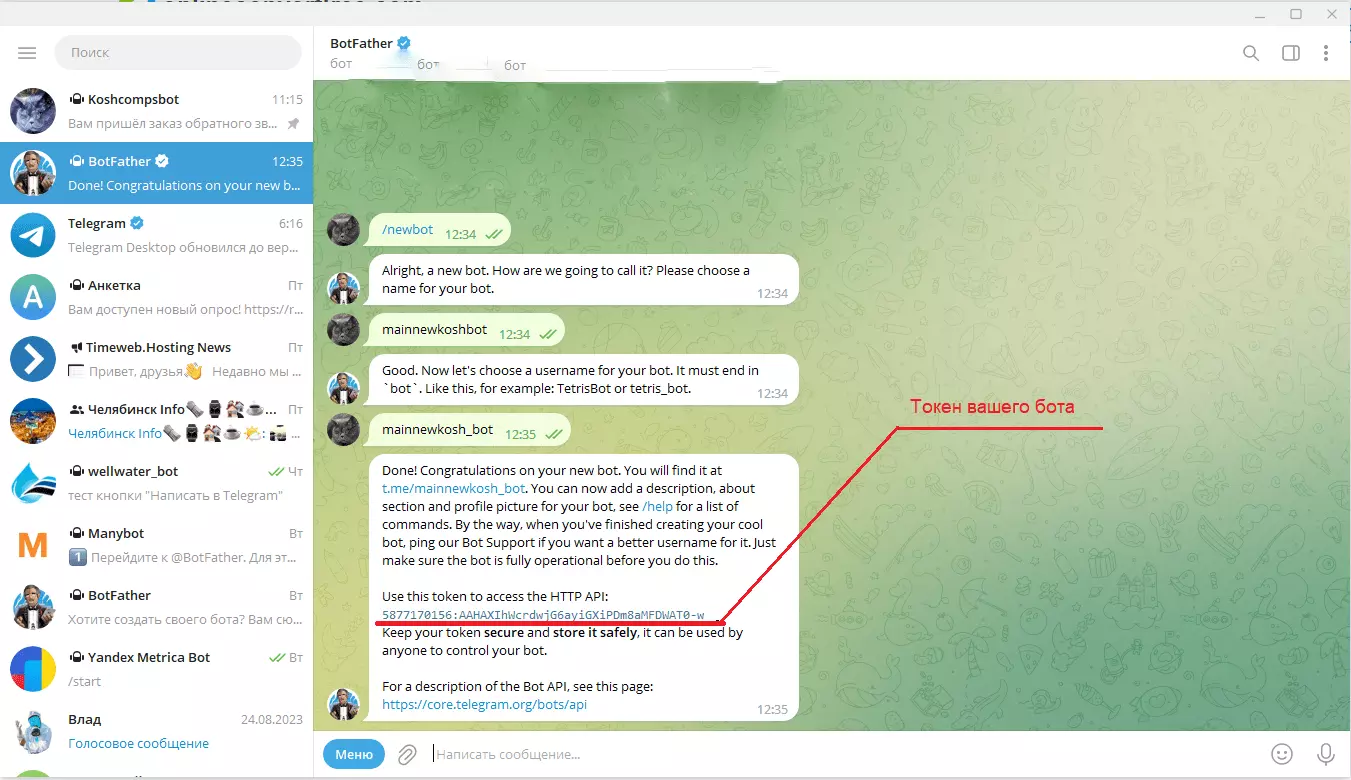
And don't forget to add the newly created bot to your contacts by sending it the /start command
Step 2. Get the bot's token and chat id
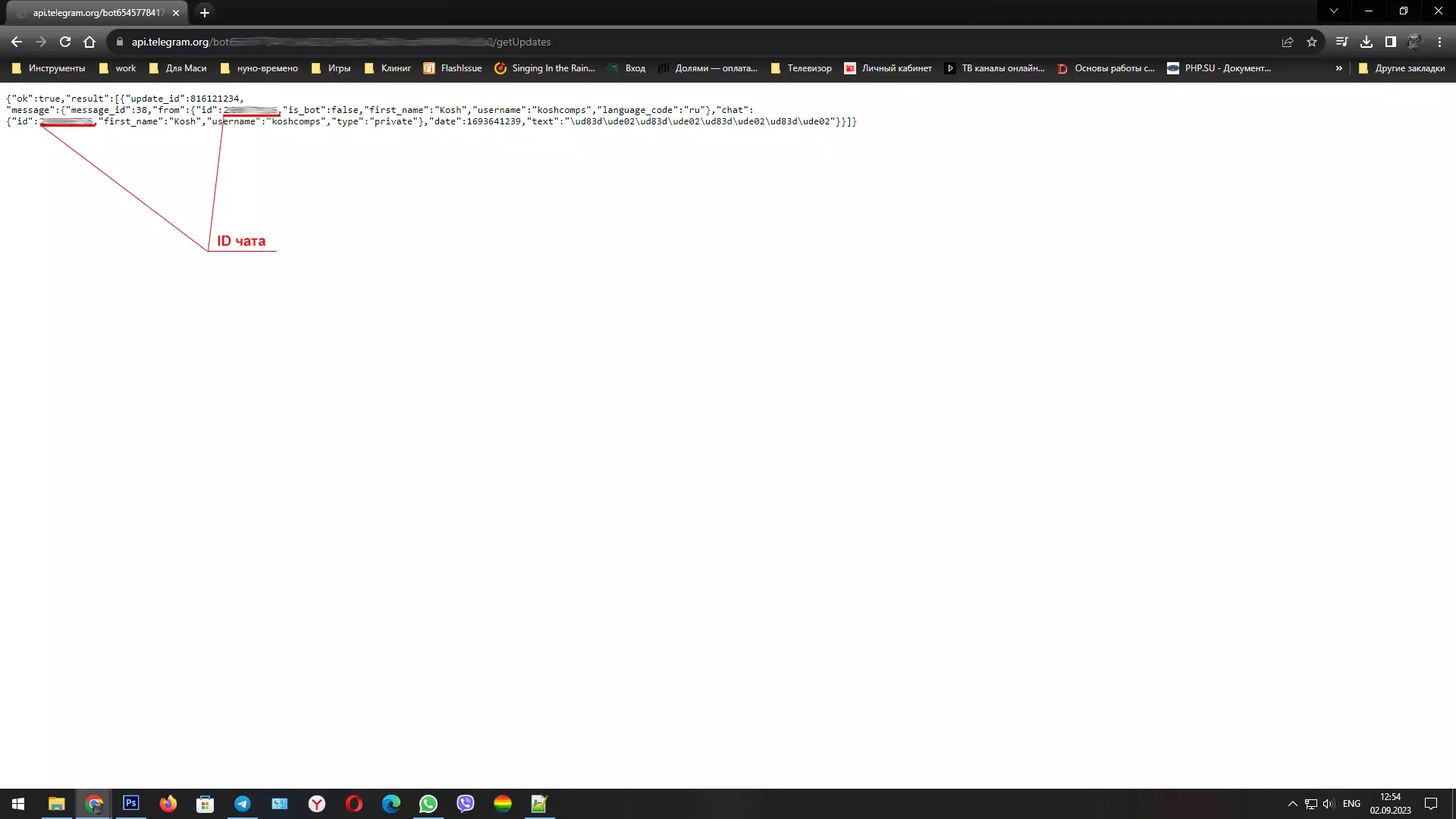
To send a message to a user via a bot, simply call a specific URL from a PHP script containing the bot's token and the internal chat ID chat id.
We already have the bot's token, and the chat id can be obtained via the browser. Send a message to the bot from Telegram, then type the following in the browser's address bar: https://api.telegram.org/botTokenBOT/getUpdates where TokenBOT is the previously received token of your bot.
Step 3. Creating a PHP script for sending messages to Telegram
In order for the bot to send a message, you need to make a request to a specific URL containing the bot token, your chat id and the text value — the text that the bot will display to the user.
You can also check the functionality directly through the browser address bar. Example line:
https://api.telegram.org/botYourBOTToken/sendMessage?chat_id=YourCHATID&text=YourMESSAGE
YourBOTToken is your bot token, YourCHATID is your chat id and YourMESSAGE is the text of the message.
You can download the source code here.
Add the bot to a Telegram group
In order for the bot to be able to send messages to a group, you need to add it there. You can do this in the group settings in the Add member section. In the search, you need to enter the name of your bot and click OK.
Now in the script settings, you need to change the user's chat id to the chat id of the desired group. To do this, you first need to write any message in the chat, and then enter https://api.telegram.org/botYourBOTToken/getUpdates in the address bar, where YourBOTToken is the previously received token of your bot. Then we find the chat object and the id in it - this will be the chat id of the group.
How do I find a group`s chat ID?
This can be done in a couple of easy steps:
- Open the official LeadСonverter | Tools bot in Telegram (https://t.me/LeadConverterToolkitBot) and click /start
- Find your group (chat), open it, and click its name
- Add the LeadСonverter | Tools bot to the group (chat) (type @LeadConverterToolkitBot into the search bar). Don`t be alarmed by the "Unknown action" message that appears. - The bot is working
- We send the command
/get_chat_id to the chat
In response, the bot sends us a message with the group (chat) ID.

Important!
Make sure to copy the group (chat) ID with the dash sign, otherwise the requests won`t work!
Now we can easily insert the chat ID into our PHP script and enjoy messages from the website in our Telegram group, coming directly from the website.
List of commands for configuring and managing the bot
Edit bots
- /setname - change the bot name
- /setdescription - change the bot description
- /setabouttext - change the bot information
- /setuserpic - change the bot profile photo
- /setcommands - change the list of commands
- /deletebot - delete the bot
Bot settings
- /token - generate an authorization token
- /revoke - revoke the bot access token
- /setinline - toggle the inline search mode (https://core.telegram.org/bots/inline#location-based-results)
- /setinlinefeedback - change the inline feedback settings (https://core.telegram.org/bots/inline#collecting-feedback)
- /setjoingroups - can your bot be added to groups?
- /setprivacy - enable privacy mode (https://core.telegram.org/bots/features#privacy-mode) in groups
Web apps
- /myapps - edit web apps (https://core.telegram.org/bots/webapps)
- /newapp - create a new web app (https://core.telegram.org/bots/webapps)
- /listapps - get a list of web apps
- /editapp - edit a web app
- /deleteapp - delete an existing web app
Games
- /mygames - edit games (https://core.telegram.org/bots/games)
- /newgame - create a new game (https://core.telegram.org/bots/games)
- /listgames - get a list of games
- /editgame - edit a game
- /deletegame - delete an existing game